How to Read Electricity Meter: An AU Solar Guide 2026
Last updated:
You open the bill, scan the usage lines, and the numbers still don't line up with what you think happened at home. Maybe you added solar. Maybe you're charging an EV. Maybe the air con barely ran and the bill still looks wrong.
That confusion is normal. Most homeowners looking up how to read electricity meter information end up on guides for old spinning dials, even though many NSW homes now have digital or smart meters. For a modern home, especially one with solar, the hard part usually isn't finding a number on the meter. It's working out what that number represents, which register it belongs to, and whether it matches the way your retailer has billed imports, exports, or different tariffs.
A meter reading becomes useful when you can connect it to your bill and to the way your home uses power. That's where things start to click. You can see when solar is helping, when the grid is still doing the heavy lifting, and whether a battery or smarter load shifting would make a real difference.
Why Your Electricity Bill Is So Confusing
Most electricity bills mix together too many moving parts for a quick glance to tell you much. You might see usage, supply charges, feed-in credits, controlled load, peak periods, off-peak periods, and a read type. If your home has solar, there's another layer again. The meter may be tracking energy flowing both in and out, while the bill only shows the parts your retailer uses for billing.
Public advice often misses that problem. Guidance still leans heavily on old dial meters, even though the practical gap for Australian households is now understanding smart meter registers, import versus export, and time-of-use periods, not merely copying a rolling number. The key issue is interpretation, particularly where the bill includes multiple tariffs or estimated readings and the home has solar, batteries, or controlled loads (modern meter guidance for residential energy reading).
That matters even more in NSW because a lot of homes are no longer on a simple one-number billing setup.
Why old meter guides don't help much
If you've searched for how to read electricity meter instructions and landed on pages about clockwise and anti-clockwise dials, you're not imagining the mismatch. Those guides can still help some homes, but they won't answer questions like:
- Which register is import when your solar system is running
- Why exports don't match expectation even on a sunny day
- Why one bill line shows peak and another shows controlled load
- Why the meter display looks right but the bill still seems off
Practical rule: If your bill feels confusing, don't assume the meter is wrong. First check whether you're looking at the right register for the tariff your retailer actually billed.
A lot of bill stress starts there. If you're already feeling pressure from changing energy costs, Interactive Solar's overview of rising electricity prices and how to prepare gives useful context for why understanding your meter matters more than it used to.
First Step Identify Your Meter Type
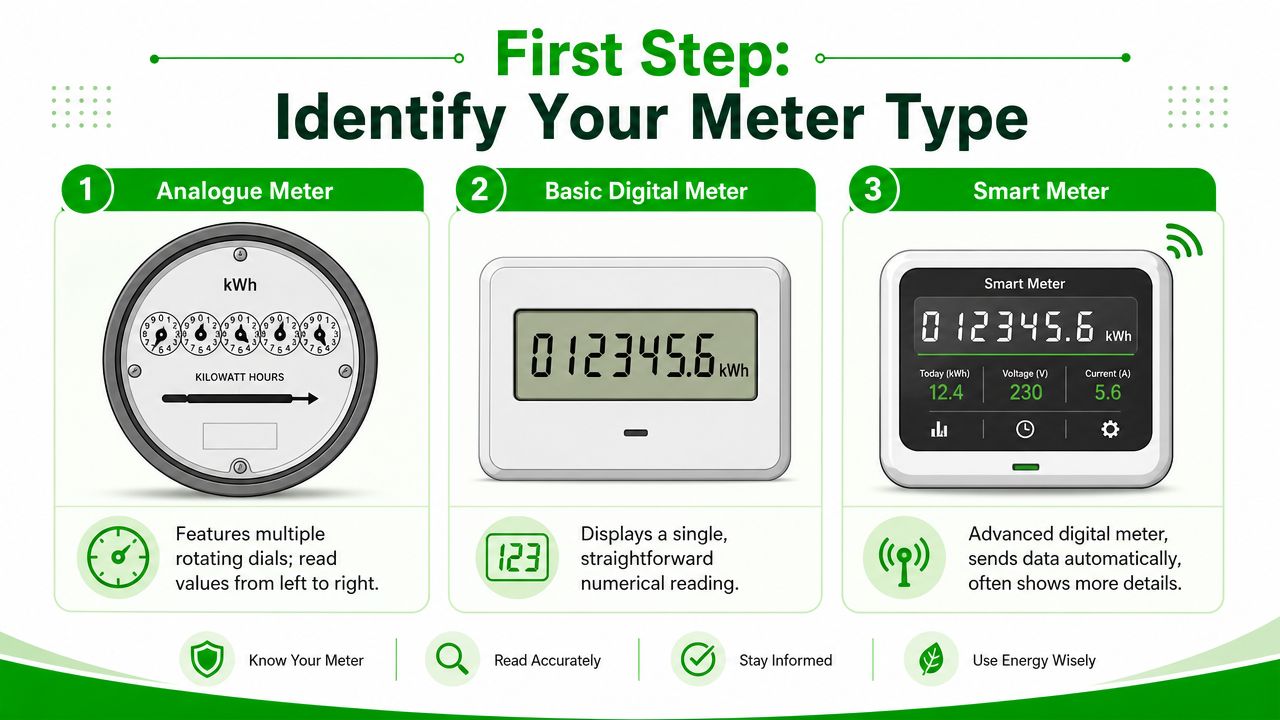
Before reading anything, identify the hardware in the meter box. That one step saves a lot of wasted effort because the reading method changes completely depending on the meter.
The three meter types you'll usually see
| Meter type | What it looks like | What matters most |
|---|---|---|
| Analogue meter | Several round dials with pointers | You read each dial carefully |
| Basic digital meter | Fixed number display | You copy the visible reading |
| Smart meter | LCD screen that cycles through data | You need the correct register, not just any number |
Quick field check at the meter box
Use this as a fast identification guide:
- Analogue meter. You'll see multiple little clock-style faces. No scrolling LCD, no menu button.
- Basic digital meter. The screen usually shows a simple numerical total without cycling through lots of screens.
- Smart meter. Look for an LCD screen that changes displays, often with a button labelled display, select, or scroll.
A lot of homeowners mistake a smart meter for a basic digital meter because both have screens. The giveaway is the cycling display and the presence of multiple data points. If the meter shows different codes, labels, or separate readings, treat it as a smart meter.
Why this step matters
If you use the wrong method, you can still write down a number that looks plausible but means nothing for billing. That's common with solar homes. Someone records whatever is on the screen at that moment, compares it to the bill, and thinks the retailer has made a mistake when they've captured the wrong register.
If you're unsure what equipment is installed at your property, Interactive Solar's FAQ page is a practical place to check common meter and system questions before you call anyone out.
Reading Older Analogue and Digital Meters
Older meters are simpler in one way. They usually give you one main reading to capture. They're also easier to misread if you rush.
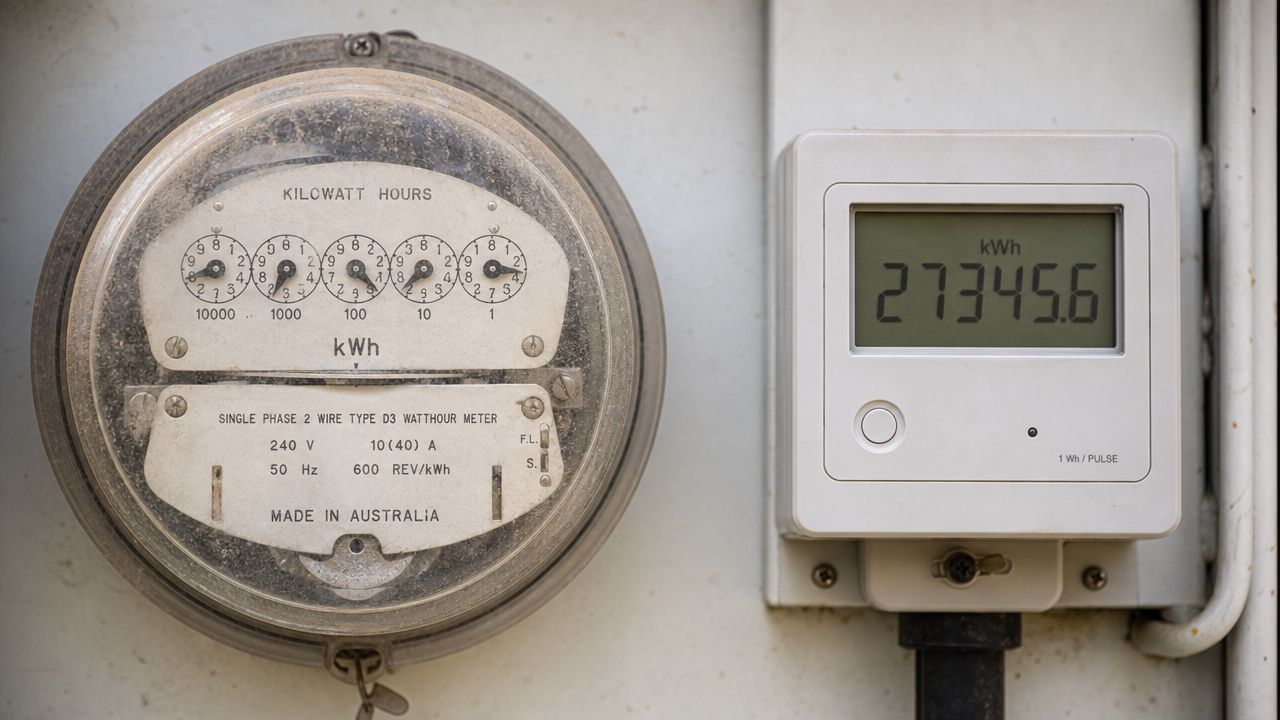
How to read an analogue meter
Analogue meters use pointer dials. Read the numbers in order across the meter face.
A safe method is:
- Start with the left-most dial and move across in order.
- If the pointer sits between two numbers, record the lower number.
- If the pointer appears exactly on a number, check the dial to the right. If that next dial hasn't passed zero, use the lower number on the current dial.
The trap with analogue meters is assuming all dials move the same way. They usually alternate direction. That's where people slip.
Read slowly. Most analogue reading errors come from one dial, not all of them.
How to read a basic digital meter
A basic digital meter is much easier. Record the main black numbers shown on the display from left to right. Ignore decimal places if they appear, and don't overthink it if the display doesn't cycle through multiple screens.
That last point matters. If the display is fixed and straightforward, treat it as a simple total usage reading unless the meter clearly labels separate tariffs.
What doesn't work
The biggest mistake with older meters is comparing one manual reading to a bill without checking the dates. The second mistake is trying to infer too much from a single number. A single read can tell you total accumulation. It can't tell you when usage happened.
If your goal is to cut bills, the reading is only the start. Practical ways to reduce electricity bills at home become much easier to apply once you know whether the problem is constant usage, evening imports, or poor solar self-consumption.
Unlocking Your Smart Meter Data
A smart meter gives you much better visibility than an old dial meter, but only if you read it properly. For Australian interval and smart meters, the practical workflow isn't “read dials”. It's to extract the cumulative kWh register from the LCD and use the correct NMI and register labels from the bill or display so the reading matches the right tariff or interval record. The Australian Energy Market Commission notes that smart meters record consumption in 30-minute intervals, which makes usage checks much more precise than old spot reads (smart meter reading and interval explanation).
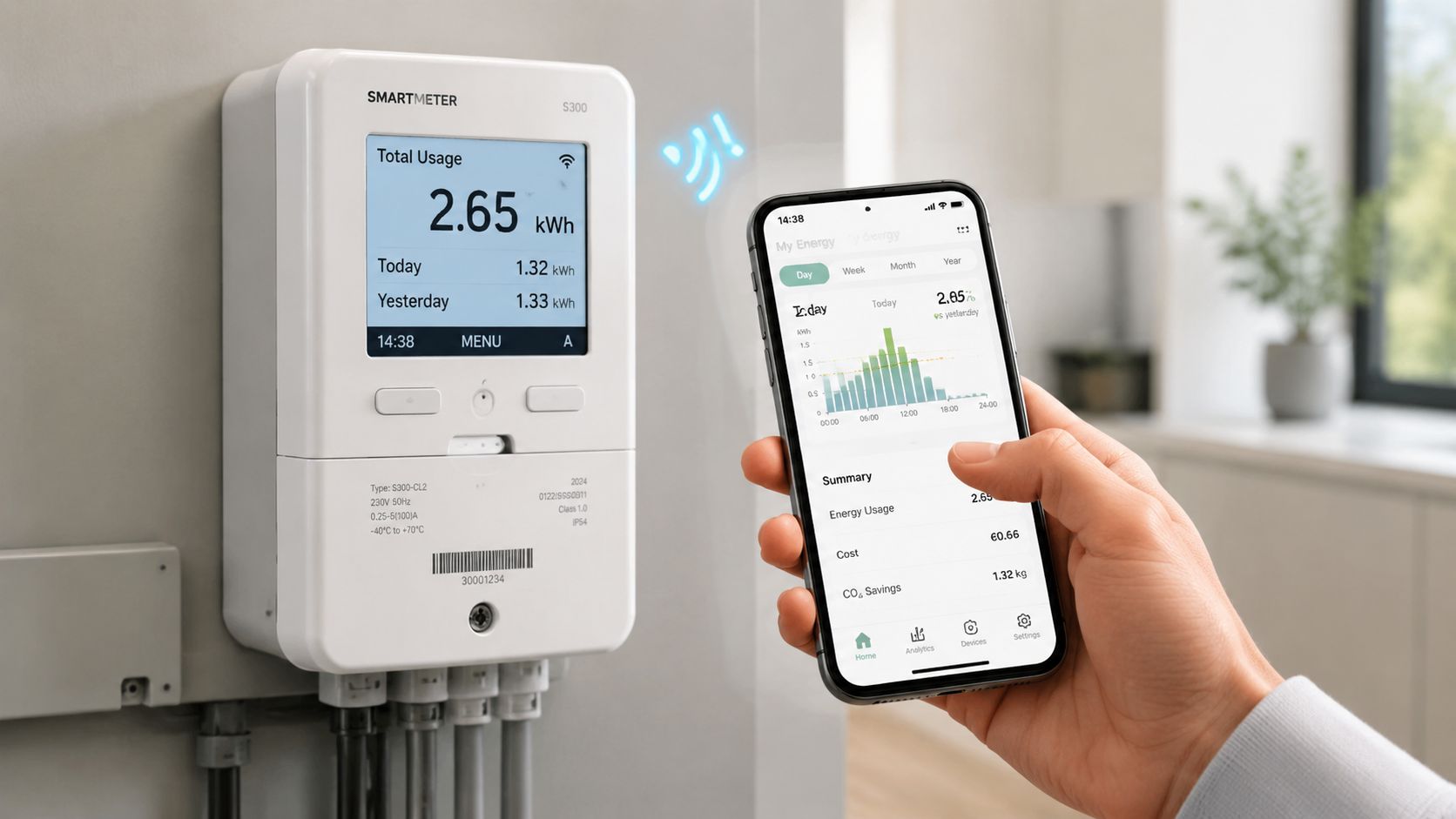
What to look for on the screen
Most smart meters have a button that cycles through displays. Press it slowly and note each screen.
Focus on these items:
- NMI. This is the National Meter Identifier tied to your property. Use it to confirm you're matching the right meter to the right bill.
- Cumulative kWh registers. These are the running totals your retailer may use for different tariffs.
- Register labels or screen codes. These identify whether a reading relates to general usage, controlled load, or another tariff bucket.
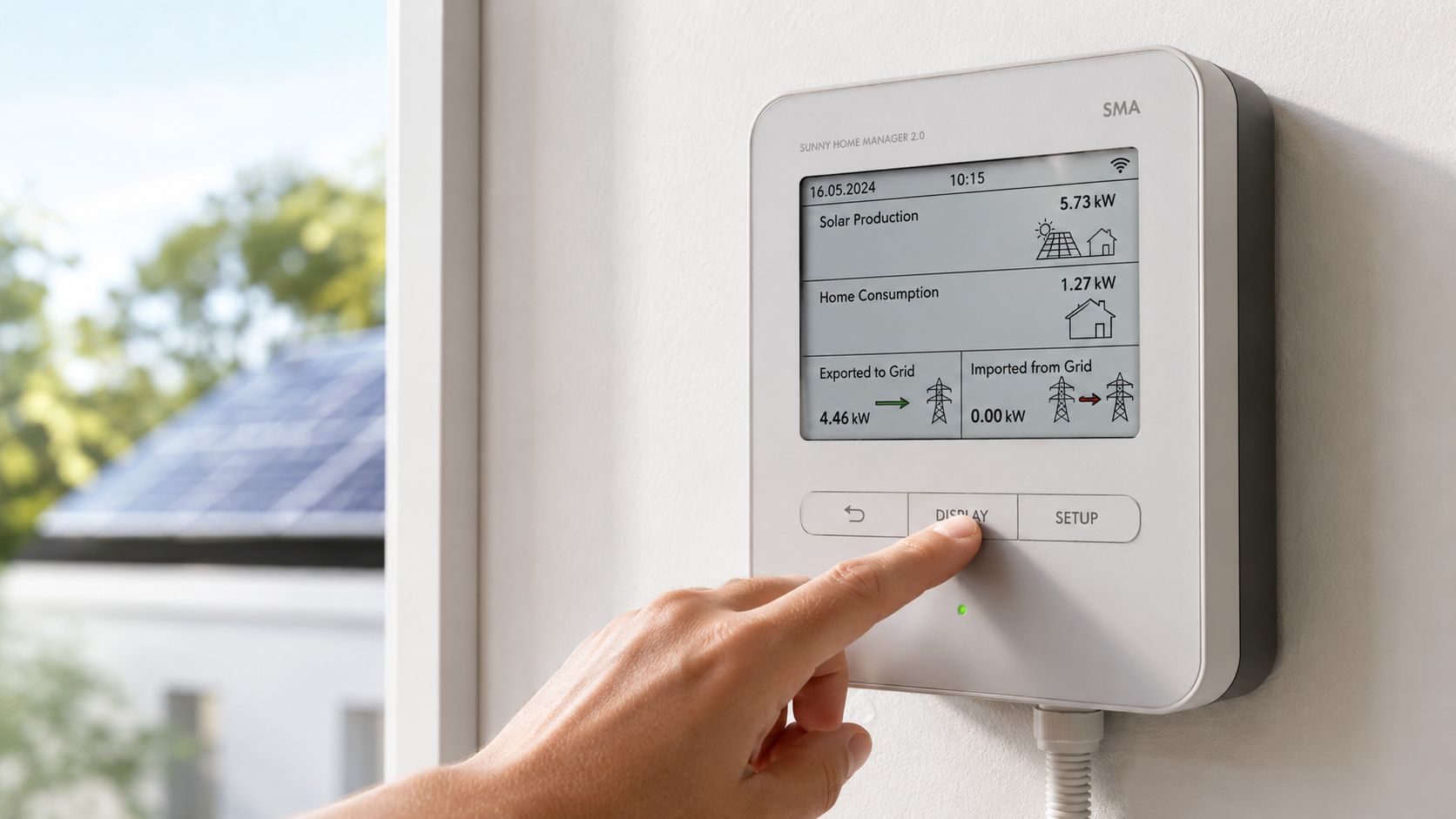
- Import and export records. On solar homes, these are often the most important screens.
Don't assume the first number shown is the one that matters. On many meters, it's just one of several registers.
Matching the meter to the bill
Here's the part often overlooked. Your bill may list tariff names differently from what the meter screen shows. The right move is to line up the register label or code on the meter with the usage line on the bill, then compare like with like.
A simple checklist helps:
- Check the NMI first so you know you're working with the right service
- Find the register name on the bill
- Cycle the LCD until you find the matching register
- Write down the full reading and the time you took it
If your home uses energy monitoring through the inverter or app, that can make this much easier. Interactive Solar's guide to inverter remote monitoring is useful if you want to compare what the solar system reports with what the meter records.
This video gives a helpful visual reference for what scrolling through a modern meter display can look like.
The practical mindset
Think of a smart meter as a data logger, not just a counter. It records a more detailed picture of what's happening at the property. That's good news for homeowners with solar because it gives you a way to separate daytime self-use, grid imports, and exported surplus instead of guessing from one total.
How to Read a Meter with Solar Panels
Solar changes the question. You're no longer just asking, “How much power did I use?” You're asking, “How much did I use from the grid, how much did my system generate, and how much did I send back?”
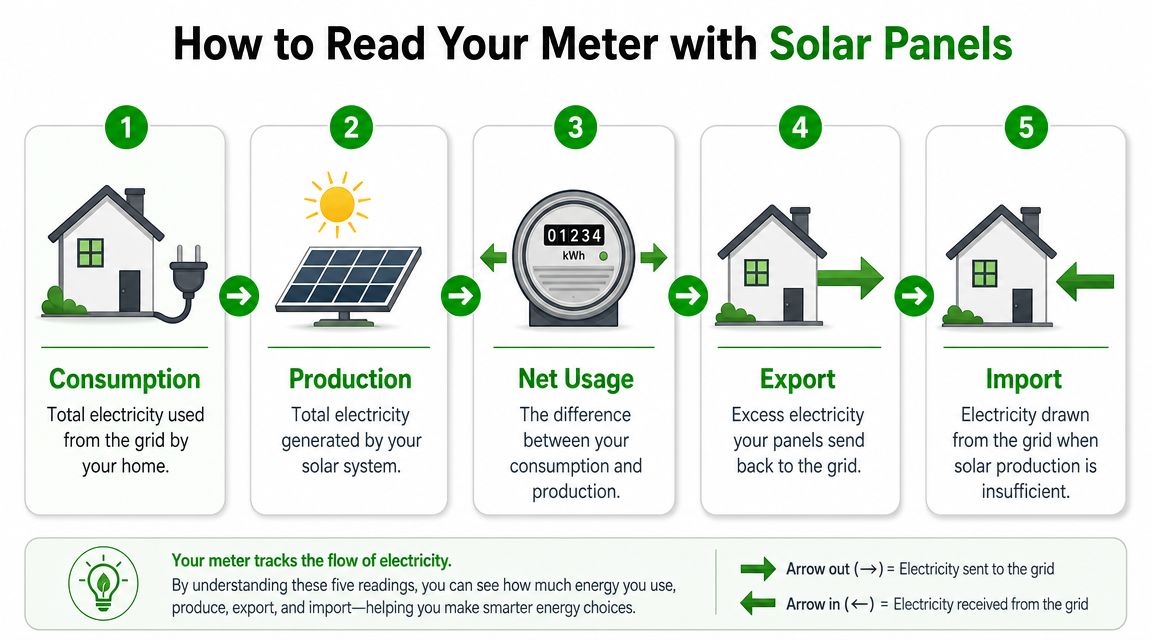
The two readings that matter most
For most solar households, the meter becomes useful when you can identify:
- Import. Electricity drawn from the grid when your home needs more than the solar system is supplying.
- Export. Excess solar generation sent back to the grid.
Those two numbers tell a very different story from a single total consumption figure. A home can generate plenty of solar during the day and still have an expensive bill if most of that generation is exported while the household buys power back later in the evening.
The best solar outcome isn't simply high generation. It's using more of your own solar before the grid gets involved.
What the numbers actually mean
If your export reading climbs quickly on bright days, your panels are likely producing more than the home is using in those hours. That sounds positive, and it is, but it can also reveal an opportunity. If the household's biggest loads happen after sunset, you may be giving away daytime solar and then importing power later when production has dropped away.
That's the pattern many homeowners notice once they start reading the meter properly. It often leads to simple operational changes first:
- Run appliances in solar hours instead of in the evening where possible
- Charge an EV during daytime generation windows if your setup allows
- Shift discretionary loads such as pool pumps or hot water timing into sunny periods where appropriate
When a battery starts making sense
If your meter shows regular daytime export and regular night-time import, the home may be a good candidate for a battery. The point of a battery isn't just backup. It's to capture more of your own solar and use it later, reducing reliance on grid imports when your panels aren't producing.
That same logic applies to EV charging. A smart charging setup can soak up solar that would otherwise be exported. For some homes, that's the difference between a solar system that looks good on paper and one that changes the household's energy habits.
One useful option for homeowners comparing meter data with solar performance is Interactive Solar, which offers solar and battery installations along with energy monitoring that can help track what's being imported from or exported to the grid.
A practical way to check your home
Do this over a few ordinary days:
| Time | What to observe |
|---|---|
| Midday | Is solar likely covering the home and pushing excess out? |
| Late afternoon | Does export fall off as solar drops and household usage rises? |
| Evening | Are imports climbing once the solar contribution fades? |
That pattern tells you more than a monthly bill summary ever will. It also gives you a clearer basis for deciding whether load shifting is enough or whether battery storage deserves a closer look.
Multipliers Tariffs and When to Call for Help
Some bills still include details that aren't obvious from the meter face alone. Tariffs are the big one. If your retailer charges different rates for different periods or separate circuits, the bill may pull from multiple registers rather than one running total. That's why a meter can look “wrong” when it's just showing one piece of the billing picture.
Multipliers can also appear on some setups, especially older or more specialised metering arrangements. If a bill references a multiplier and the reading doesn't make sense, don't guess. Ask the retailer to explain exactly how the billed usage was derived from the meter register.
Actual reads versus estimated reads
A very common pitfall in Australia is comparing an actual self-read to a bill based on an estimated read. The Australian Energy Regulator says meter reads can be actual, estimated, or customer read. If the bill uses an estimated read, the charge may reflect projected consumption rather than true usage. The right method is to record the meter at the same point in the billing cycle and compare only like-for-like reads. For homes with solar or time-varying load, matching the same time of day matters because interval data is collected in 30-minute blocks (estimated and actual meter read guidance).
Check the bill's read type before you challenge the usage. A lot of “meter problems” are really timing problems.
When to contact the retailer and when to call a licensed electrician
Call your retailer or distributor if:
- The bill says estimated and you want it reviewed against an actual reading
- The tariff looks wrong for the way the property is set up
- The NMI or meter details don't match the property paperwork
Call a licensed electrician or solar installer if:
- The meter box is damaged or appears unsafe
- Your solar generation and meter behaviour don't line up
- A controlled load, battery, or EV charger doesn't seem to be operating as intended
If you manage a mixed-use property or a workspace and need broader electrical planning, a practical reference point is Constructive-IT's guide to electrical services for office fit-outs, especially where metering, circuits, and fit-out decisions overlap.
For consumer protections around system recommendations, contracts, and installation conduct, the New Energy Tech Consumer Code explained by Interactive Solar is worth reading before you commit to any new energy equipment.
If your meter readings still don't line up with your bill, or you can see you're exporting solar by day and importing too much at night, it may be time to get the system looked at properly. Interactive Solar can help you assess how your meter data relates to solar performance, battery suitability, and smarter energy use at home.
Make Interactive Solar a preferred source in Google
One click tells Google to surface our articles more often in Top Stories, AI Overviews and AI Mode.